
Quote the job before you leave the driveway.
BayQuote turns a few photos of a paver patio, retaining wall, or backyard cleanup into a professional, priced estimate, and lets your customer accept it online in minutes, not days.
Just quoting, done properly: no scheduling, no CRM, no per-seat math. If you need a tool to run your whole operation, BayQuote isn’t that (see how it compares to Jobber).
▲ BayQuote drafting a branded landscaping estimate from site photos, then sending an accept-by-link quote a customer can approve from their phone.
From photos to a paid job, fast
Most landscapers lose jobs to whoever quotes first. BayQuote compresses days into minutes.
Snap photos, share the details
Walk the site and describe the job: a paver patio, a retaining wall, a mulch-and-cleanup. BayQuote estimates rough dimensions on its own, or use your own takeoff when you want precision.
AI drafts the estimate
BayQuote reads the photos and your notes against your price book and drafts a line-item estimate in seconds.
Customer accepts on the spot
Send a link by text or email. They review and tap Accept from their phone, often before you've left the driveway.

Worried the AI's measurements won't be accurate? It drafts rough dimensions in seconds from your photos. Always override with your own measurements before you send. The price only ever comes from your price book, never invented.
Worried you'll outgrow it, like some crews outgrow Jobber? BayQuote is built to stay simple: quoting only, one flat price no matter how big your crew gets.
Switching from Jobber or a spreadsheet? Import your price book and quote your first job today. No migration project. And since it's free while you're in the Founding Feedback Program, there's nothing to lose trying it.

Skip the tape measure, not the accuracy.
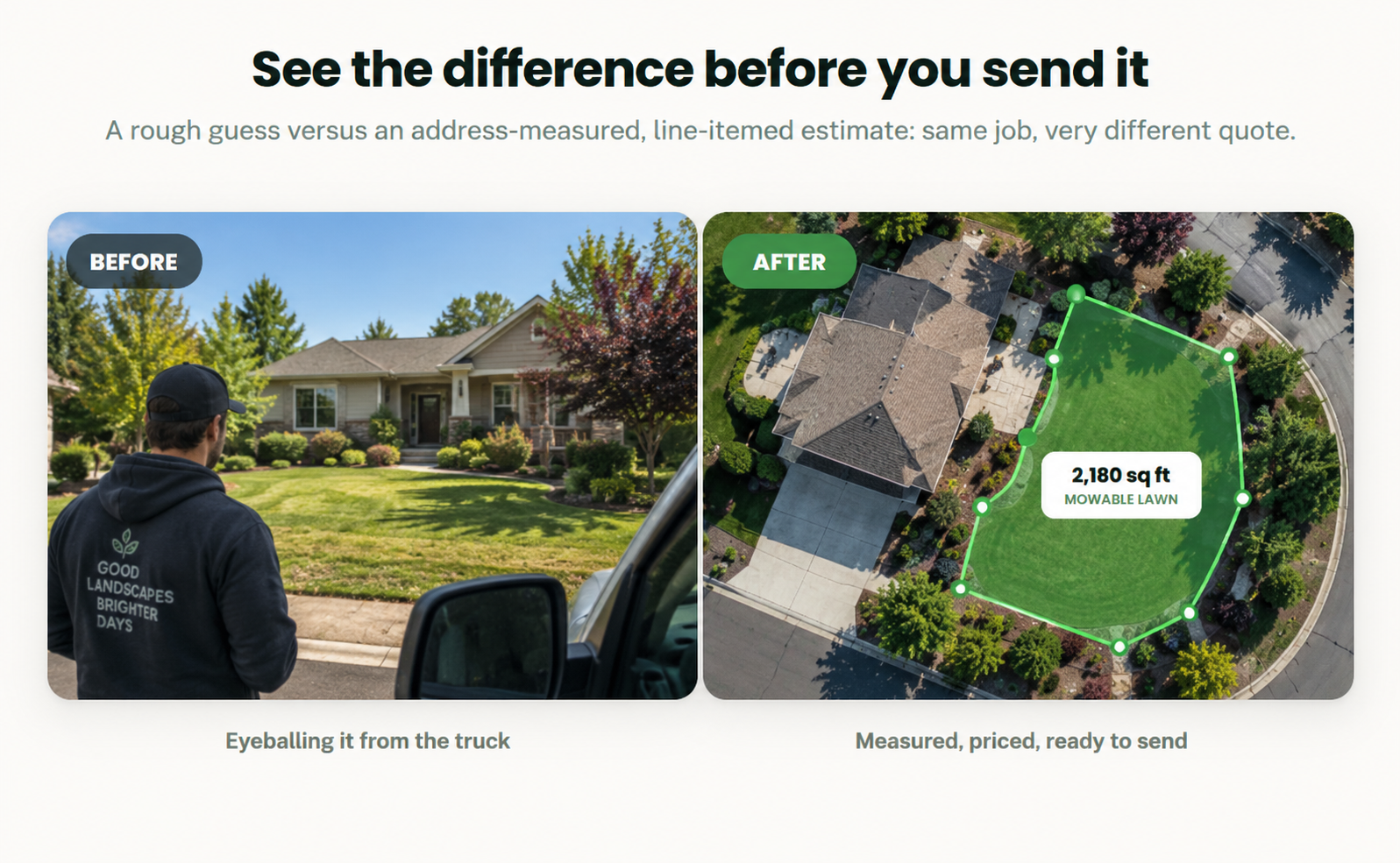
Type in the customer's address and BayQuote pulls an aerial view to estimate lawn, driveway, patio, and roof area automatically, before you've even pulled up to the curb. Always yours to review and adjust, never locked.
- Works from an address alone, no site visit required to get started
- Separates lawn, driveway, patio, and roof into their own measurements
- Drops straight into the quote as an editable line item
See the difference before you send it
A rough guess versus an address-measured, line-itemed estimate: same job, very different quote.
Speak your customer’s language
The Bay Area runs on more than one language. BayQuote keeps up with your crew and your customers.
Run the app in English or Spanish
Chosen once at sign-up or when you invite a teammate: every screen, every button, the whole quoting flow. Not just a translated label here and there.
Send every quote in your customer’s language
Pick a language when you hit send: the customer gets a fully translated PDF, email, and accept-online page, no matter what language your crew built the quote in.
Get paid without the chase
Stop trailing invoices after the job’s done. Let the customer pay the moment they say yes.
Request a deposit or full payment
Turn it on per quote when you hit send, or set a default deposit percentage once in Business Settings. The customer pays by card right on the accept page, no separate invoice, no chasing a check.
Funds go straight to your bank
Payments run through Stripe Connect directly into your own account. BayQuote never touches the money and takes zero cut. Stripe’s standard processing fee is the only cost.
Everything you need to quote like a pro
AI drafts it from photos, no more typing square footage
Snap a few photos and jot a quick description. BayQuote reads them against your price book and drafts line items and quantities in seconds: square footage, linear footage, whatever the job needs. You still set every rate; the AI just skips the typing.
Send quotes in 5 languages, not just your own
English, Spanish, Vietnamese, Tagalog, or Chinese: pick a language when you hit send, and your customer gets a fully translated PDF, email, and accept-online page. No competitor in landscaping quoting offers this.
Instant accept-by-link
A no-login page your customer can open and accept in one tap. No printing, no waiting on email.
Flexible price book
Flat rates or cost + markup: price materials the way your business actually works.
Branded quotes
Professional PDF and email quotes with your business name, logo, and contact info.
Win-rate dashboard
See which bids are converting: sent, accepted, and total value at a glance, without touching a spreadsheet.
Collect deposits online
Request a deposit or full payment right on the quote. Customer pays by card the moment they accept. Funds go straight to your bank via Stripe, zero cut taken by BayQuote.
Reusable packages
Save common job bundles (a standard paver patio, a retaining wall package) once, and drop them into future quotes in a tap.
Turn your bio into leads
Share one link on your website or social profile. Anyone who fills it out lands straight in your queue as a ready-to-price draft, no more digging requests out of your inbox or DMs.
Automatic follow-up reminders
A quote that's sat too long gets a reminder, sent for you, no more remembering to chase a customer down yourself.
Before & after photo gallery
Add photos to a finished job and build real proof for your own marketing: your website, your feed, wherever you show off the work.
Revise a quote in one tap
Plans change. Send an updated version of a quote without starting over from scratch or losing the original.
Use BayQuote with the tools you already use
BayQuote is focused on one thing: making it easier to measure, build, and send great quotes.
| BayQuote | Jobber | |
|---|---|---|
| What it's for | Fast, accurate quoting | Scheduling, invoicing, crew dispatch |
| AI quote from site photos | — | |
| Send a quote in your customer’s language | — | |
| Export a quote to use anywhere else | Plain CSV, any tool | — |
BayQuote doesn't try to replace Jobber, Housecall Pro, or similar platforms — their scheduling and crew management is a different problem than quoting. Many contractors use BayQuote just for the fastest part of quoting a job and export every quote as CSV to keep using their existing platform for everything else. See the full BayQuote vs. Jobber comparison.
Help us make BayQuote better.
We're giving landscape professionals free access to BayQuote while we spend the next few months making it as good as it can be. Use it on real jobs — tell us what works, what doesn't, and what you'd change.
What's expected
- Use BayQuote on real jobs
- Give us honest feedback about once a week
- Help shape what we build next
Free access while you're participating.
Common questions
How much does it cost?
Nothing right now. BayQuote is currently free to use through the Founding Feedback Program — full access, in exchange for an honest check-in about once a week. We're not running the normal paid plan while the program is open.
How is the price on a quote actually calculated?
You set your own rates in your price book: cost per square foot, per linear foot, per job, however you already price work. When you quote a job, AI estimates the scope and quantities from your photos and description, then matches them to your price book rates. The AI never invents a dollar amount. Every price traces back to a rate you set, and you can edit anything before it's sent.
Is there a contract or long-term commitment?
No. You can stop using BayQuote or leave the Founding Feedback Program whenever you want — nothing you've built gets deleted.
How does my customer actually accept a quote?
They get a link by email (with a PDF attached) and open a page where they can review and accept with one tap. No printing, no account or login required on their end.
